
What happens to Your Support Request?
Requests are logged via email to support@nliventix.com or by filling out our support form in the Tickets Portal - they are then received by the Ticketing Services Team through HubSpot. Our Ticketing Services Team focuses on answering questions and helping troubleshoot issues as quickly as possible.
We also recommend you check out our nLiven Troubleshooting Guide for frequently asked questions and configuration issues, as well as chat with Navi, our AI agent, on the Help Center homepage for instant, intelligent answers around the clock.
When submitting a support request, please make sure to provide as much detail as possible - your account, event(s) affected, steps to reproduce what you have experienced, attachments, screenshots, etc. The more detail provided, the quicker we will be able to triage your request, especially when assistance from our engineering team is required.
The Ticketing Services team is always available during the hours of 9:00 AM to 6:00 PM local time Monday through Friday.
For urgent and high priority items, additional 24/7 support is provided as outlined in the process detailed below.
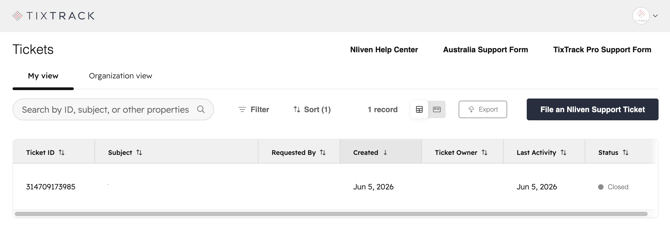
How to View Your Support Requests
You can view support requests filed by yourself or others within your organization by logging into your Tickets Portal (which also includes a link directly to the nLiven Help Center).
How to Contact nLiven US/UK
Urgent or High Priority
- Submit requests via the Support Form OR email support@nliventix.com with either "Urgent-Priority" or "High-Priority" followed by a short issue description included in the subject line. Our support portal is the FASTEST way to get support.
Normal or Low Priority
- Submit requests via the Support Form OR email support@nliventix.com with either NORMAL or LOW in the subject line.
How to Contact nLiven AU/NZ
Urgent or High Priority
- Submit requests via the Support Form OR email ausupport@nliventix.com with either "Urgent-Priority" or "High-Priority" followed by a short issue description included in the subject line. Our support portal is the FASTEST way to get support.
Normal or Low Priority
- Submit requests via the Support Form OR email ausupport@nliventix.com with either NORMAL or LOW in the subject line.
Prioritization of Issues / Service Level Agreement
| Priority Level | Status | Definition | Initial Response Time | Examples |
| 1 | Urgent |
Incidents in this category are production issues that have a disastrous impact on either:
The event and/or problem may render the System and nLiven Service non-functional. |
15 minutes |
|
| 2 | High |
Incidents in this category are production issues that have a major negative impact on either:
The event and/or problem may severely impact the performance of the System and nLiven Service. |
1 hour |
|
| 3 | Medium |
Incidents in this category are production issues that have a minor negative impact on either:
|
3 days |
|
| 4 | Low |
Incidents in this category are production issues that have a negligible negative impact on either:
|
7 days |
|